- The Rideshare Guy
- Posts
- Redtiger F17 Plus Dash Camera Review
Redtiger F17 Plus Dash Camera Review

Redtiger F17 Plus Dash Camera Review
— By Chuck Driver —
Every rideshare and delivery driver absolutely needs a dash camera—it’s an essential tool for gig workers!
Not only will it protect you against false allegations and provide crucial evidence in case of an accident, but it also acts as a deterrent against unruly behavior from passengers.
And if you’re looking for a budget-friendly dash camera that is packed with extensive features, Redtiger’s F17 Plus 4-channel dash camera delivers outstanding value and performance!
WHAT IS IT?
The Redtiger 4-Channel Dash Camera. This system has a front forward-facing 2.7k camera, two internal 1080p cameras, and a rear-facing 1080p camera.

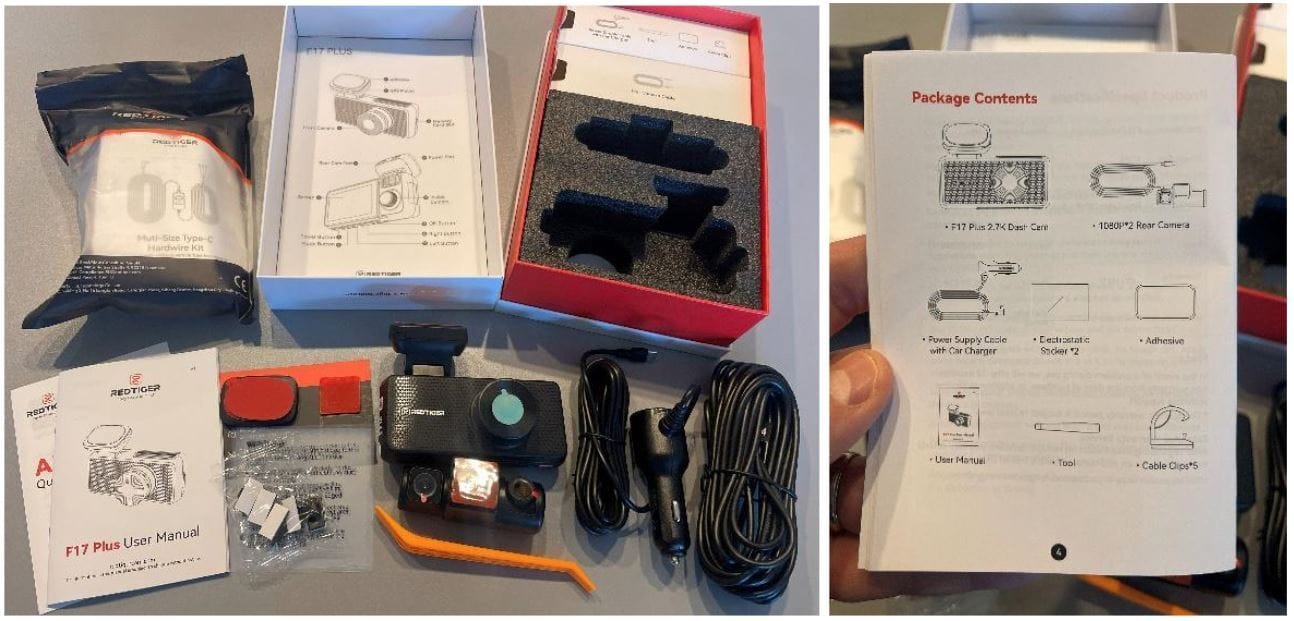
WHAT’S IN THE BOX?
F17 Plus 2.7k Front Dash Canera + 1080p Cabin Camera
1080p Rear Cabin +1080p Back Camera
128 GB SD Card
Power Supply Cable with 12-volt Car Charger
Electrostatic Stickers (4)
Extra Dash Cam Mount Adhesive
Install Tool
Cable Clips (5)
User Manual
APP Quick Book
TECH SPECS
Video Resolution: Front 2.7k + Front Cabin 1080p + Rear Cabin 1080p + Rear 1080p
Redtiger Cam App Live view
Touch Screen
Voice Control Command
Recording Duration: 1/3/5 minutes
Micro SD Card Max Support: 512gb
Video Format: MP4
G-sensor: Off/Low/Medium/High
Connectivity: Bluetooth, Wi-Fi
Parking Monitor when connected to the ACC hardwire kit
GPS Status
Onscreen Playback Capability
Screensaver: Off/10 secs/20 sec/2 mins
Time Style: 12hr/24hr
Warranty: 18 Months
DESIGN AND FEATURES
The Redtiger F17 Plus 4-channel dash camera is an impressively comprehensive unit. It features a 2.7K front-facing camera and a 1080p cabin-facing camera, both of which are adjustable for optimal coverage.
The design is sleek, thin, and sturdy—definitely built to last! All controls are easily accessible through four buttons at the bottom or via a smooth touchscreen interface.
For those who might be new to dash cameras or not particularly tech-savvy, Redtiger makes it easy to get started. The package includes a large quick guide and removable labels on the camera itself, simplifying the setup process.
The Redtiger F17 Plus comes with a second unit that serves as both a rear interior cabin camera and a rear-facing camera. This compact unit is adjustable, allowing you to tilt both cameras for the best viewing angles tailored to your vehicle.
The rear interior cabin camera is particularly useful for rideshare drivers, providing a closer look at the backseat. However, the rear-facing camera struggles at night due to glare from the headlights of trailing vehicles, which can diminish its effectiveness as its primary purpose is to help establish fault in the event of an accident.

INSTALLATION & SETUP
Installing the RedTiger F17 Plus is a breeze! Start by cleaning your windshield with glass cleaner and a microfiber towel to remove any dirt and debris. Next, use an alcohol cleaning pad to prep the area where you’ll mount the dash camera.
While these items aren’t included, taking this extra step is definitely worth it! Once your windshield is dry, choose a mounting spot for the dash camera that is easily accessible but doesn’t obstruct your view.
After selecting your mounting location, I highly recommend using the provided electrostatic stickers. The quick-disconnect bracket for the main dash camera unit adheres nicely to these stickers, making it much easier to remove the camera if you ever need to change its position or switch vehicles.
Be sure to press down firmly when attaching the mounting plate to the electrostatic sticker, and allow a few minutes for it to properly adhere before sliding the dash camera unit into place. This ensures a secure fit!

Repeat the cleaning and mounting process for the rear unit, which is also straightforward to install. Be sure to press down firmly for about a minute to ensure it adheres securely to the rear window.
Next, connect the supplied power cord and run it to the main unit in the front. This part can be the trickiest, as you’ll need to tuck and hide the power cord behind your vehicle’s trim. While a trim tool is included to assist with this, don’t hesitate to opt for professional installation if you’re not comfortable tackling it yourself.
After connecting the power cord from the rear dash camera unit to the main unit, you’ll need to power both cameras using the supplied cable connected to a 12-volt car charger adapter. I found it convenient to plug this into the 12-volt charge port inside my armrest.
And voilà! The unit boots up quickly, and your dash camera is perfectly installed.
Special Note: If you want to utilize the Parking Monitor functions, you’ll need to connect to the ACC hardwire kit. I highly recommend professional installation for the hardwire kit to ensure everything is set up correctly.
Before using your dash camera, be sure to select your time zone and configure other settings. My Redtiger F17 Plus arrived with a 128GB SD card already installed, though your experience may vary. The Redtiger smartphone app allows you to connect and view live video feeds directly on your smartphone while you’re in the vehicle. This feature is perfect for helping you find the best viewing angle for the front interior cabin camera.

PROS
Outstanding Video Quality: Exceptional clarity for the price, offering fantastic value!
Simple Installation and Setup: Quick and hassle-free to get started.
Loaded with Features: Comes packed with a variety of useful functions.
User-Friendly Interface: All buttons and functions are easily accessible via the four buttons at the bottom or the smooth touchscreen interface.
Supports Up to 512GB SD Memory Card: Perfect for rideshare and delivery drivers, allowing for extensive video playback.
CONS
Connectivity Issues with the App: I experienced several difficulties connecting the dash camera to the Redtiger smartphone app.
Distorted Built-In Speaker: The sound quality becomes distorted when playing music at medium volume or when the climate control is on high. This could be a concern for rideshare drivers trying to capture unruly passengers.
Rear-Facing Camera Needs Improvement: It’s challenging to read license plate numbers during the day, and glare from headlights at night can render it ineffective. Keep in mind that my rear window is slightly tinted and has some dirt from road salt due to a recent winter storm.

PERFORMANCE
I feel like I have complete 360° protection with this setup! The video quality from the 2.7K Sony STARVIS 2 front camera is outstanding and sharp, making it easy to read license plates within close range. This is especially beneficial for rideshare and delivery drivers, providing an extra layer of safety against potential road hazards.
The interior 1080p front-facing camera delivers clear, sharp footage and provides full coverage of the entire cabin. Its night vision is the brightest I’ve ever seen on a dash camera—so bright, in fact, that I mistook it for my interior light being on!
Overall, I’m really impressed with the performance of the Redtiger F17 Plus dash camera and would highly recommend it to all rideshare and delivery drivers!

Did someone forward you this newsletter? Subscribe now for free so you never miss an update…
Never miss a Rideshare Guy update…